FAQs
How do I get sound for Music Mondays?
Music Monday must use embedded YouTube videos to accommodate copyright laws of the artists and producers. Mobile phones and tablets do not auto-play audio from YouTube so you will need a desktop computer or laptop.
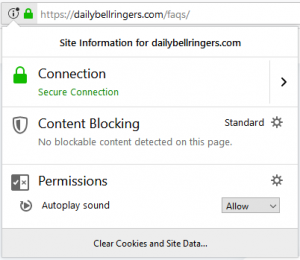
While on a desktop browser all you need to do is give permission to dailybellringers.com to play sound.
*Some browsers will also require you to load the entire presentation (which means you have to go to every slide and wait a few seconds) before working properly.*
To allow auto-play in Chrome, click on the lock icon above in the browser bar (to the left of the url). Select “Site settings” and then change the Sound setting to “allow.” You will have to reload the page.
To allow auto-play in Firefox, click on the lock icon above in the browser bar (to the left of the url) and select “Allow” for auto-play sound.
Who are Daily Bell Ringers for?
Daily Bell Ringers are designed to be used by anyone who works with groups of teens.
All content is appropriate for middle schools, high schools, and youth groups.
You will need a computer or laptop (preferably displayed on a large screen). Some days you will also need a speaker for audio. I suggest using the Chrome browser for your best experience.
Mobile phones and tablets will not work for Music Monday bell ringers due to how audio is treated in mobile browsers.
All content is original unless otherwise stated.
Can I share my account with a colleague?
No, thank you! Organizations have the option to sign up for a Team Plan where they can host 15 Educator Accounts at a 50% off group rate.
How to I change my membership?
You can change your plan within the Subscription tab of your Account page or simply click here!